

- Sign into your account
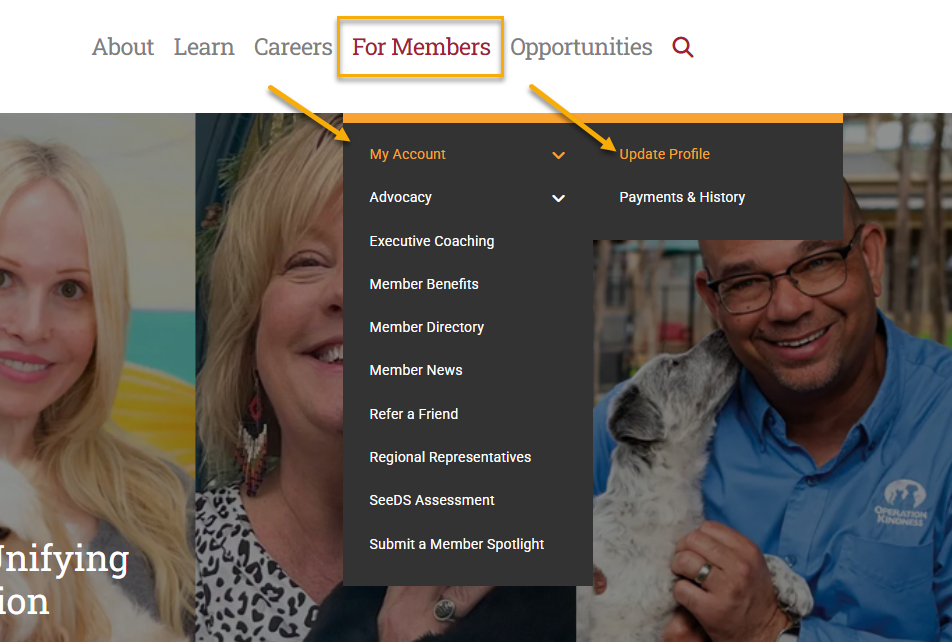
- Under For Members at the top of the page, click My Account > Update Profile
- Scroll down the page & fill out as much information as possible.
- Click Save Changes
* To update your name, email support@theaawa.org.
- Sign into your account
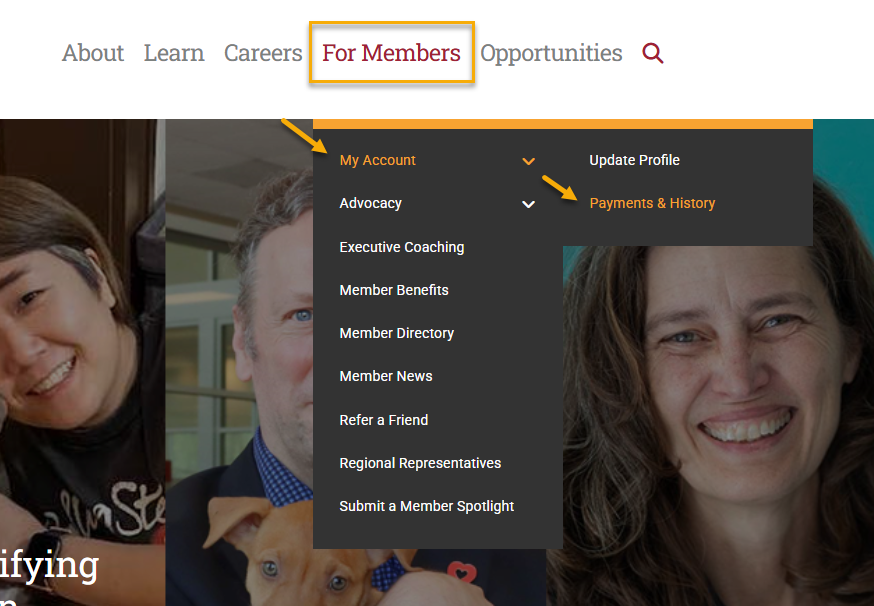
- Under For Members at the top of the page, click My Account > Payments & History
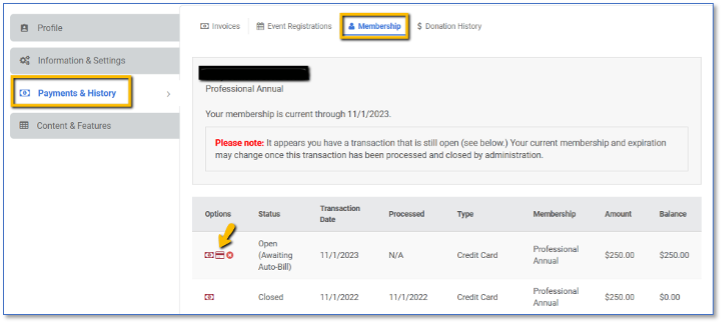
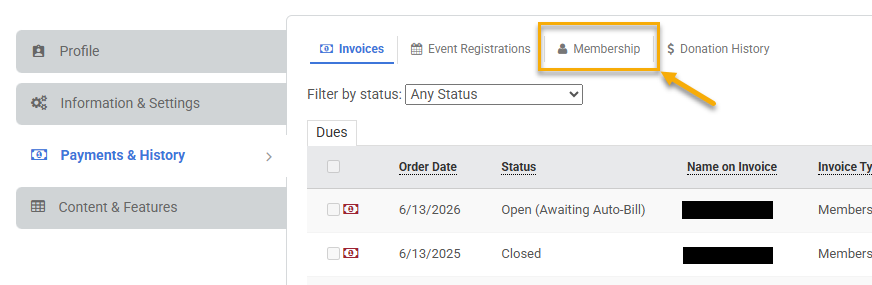
- Select the Membership tab.
- The credit card icon next to your open invoice allows you to update your billing information.
- Sign into your account
- Under For Members at the top of the page, click on My Account > Payments & History
- Select the Membership tab.
- The red x icon next to your open invoice allows you to cancel your auto-renewal.

If you've received a membership promo code from The Association, follow the instructions below based on your membership status.
New Members
- Visit our membership page and click Join The Association.
- Select the membership type that corresponds with your membership promo code.
- Complete the registration process.
- On the payment page, enter your membership promo code in the Promo Code field and click Apply.
- Verify that your membership discount has been applied.
- Enter your billing address.
- If your membership promo code covers 100% of your membership, select Bill Me to complete your membership registration. You will not be billed. Selecting Bill Me simply allows the system to complete your membership registration or renewal without requiring a credit card.
Current Members Renewing Their Membership
If Your Membership is Enrolled in Auto-Bill
Membership promo codes cannot be applied to memberships that renew automatically through auto-bill. To use a membership promo code, you'll first need to cancel auto-bill. Once auto-bill has been canceled, you can immediately renew your membership using your promo code.
- Follow the instructions in our FAQ, "How do I cancel my auto-bill?"
- Once auto-bill has been canceled, manually renew your membership.
- Enter your membership promo code on the payment page and click Apply.
- Verify that your membership discount has been applied.
- Enter your billing address.
- If your membership promo code covers 100% of your membership, select Bill Me to complete your renewal. You will not be billed. Selecting Bill Me simply allows the system to complete your membership registration or renewal without requiring a credit card.
If Your Membership Is Not Enrolled in Auto-Bill
- Renew your membership.
- Enter your membership promo code on the payment page and click Apply.
- Verify that your membership discount has been applied.
- Enter your billing address.
- If your membership promo code covers 100% of your membership, select Bill Me to complete your renewal. You will not be billed. Selecting Bill Me simply allows the system to complete your membership registration or renewal without requiring a credit card.
Please note: Membership promo codes must be applied before completing your membership purchase or renewal and cannot be applied retroactively after payment has been processed.
Having Trouble?
If your membership promo code isn't working or you have questions about eligibility, please contact us at membership@theaawa.org, and we'll be happy to help.
- Sign into your account
- Under For Members at the top of the page, hover over My Account, and click on Payments & History. This will open the Payments & History Window.
- Make sure the Dues tab is selected if you’re looking for a membership payment.
- Make sure the Stores & Events tab is selected if you’re looking for conference, job posting, or other store related receipts.
- Set the Filter by status dropdown to Any Status
- The icon to the left of the order date will allow you to view/print your receipt.


- Log into your account
- Navigate to For Members > Member Directory.
- Use the search bar to enter the name of the member you're looking for.
- Click on a member's name to view their profile and available contact information.
Search Tips
Use the directory filters to find members by:
- Name
- Organization
- Role
- Location
- CAWA Credential
- Organization Type
If you're having trouble finding a member, please contact us at membership@theaawa.org, and we'll be happy to help.